For Researchers
Everything you need
to share, link and discover.
How to deposit
Connected sources. Check with your library or repository manager. If it isn't yet indexed by OpenAIRE, contact us to get it added.
-
Choose a connected repository
Deposit in Zenodo or in a repository from an organisation connected via OpenAIRE Monitor or Connect, your output will be indexed automatically. Not sure if your repo is connected? Check with your library.
-
Prepare your metadataInclude your title, authors with ORCIDs, abstract, keywords, funder acknowledgement with grant ID, and an open licence (CC-BY recommended). The more complete your metadata (e.g., links to data, publications, software, trials, protocols, etc.), the richer the connections OpenAIRE can make.
-
Upload your fileDeposit your manuscript, dataset or software. For papers, the accepted version (post-print) is usually fine even if the journal version is behind a paywall.
-
Your record appears in the Graph and Explore
For connected sources, indexing is automatic. Your output appears in Explore linked to your grant and ORCID, no further action needed. This may take up to one month, until the next refresh of the OpenAIRE Graph.
When depositing in Zenodo, your records appear in the Graph immediately, so you may view, share, link them to your ORCID, or report you your funder.
Where to deposit
Check for OpenAIRE Guidelines compliance. Repositories that follow the OpenAIRE Guidelines produce richer, more consistent metadata, meaning your work links correctly to your grant and ORCID, and is more visible in search.
Add an Open Access version to your publication
If your publication is already indexed in OpenAIRE but only a closed or restricted version is available, you can make it openly accessible yourself in just a few clicks. There's no need to contact your repository manager or recreate the publication record.
Using OpenAIRE Explore or OpenAIRE Connect, you can upload your accepted manuscript or post-print directly to Zenodo. If your ORCID is already linked to the publication, all bibliographic metadata is automatically reused, so you only need to upload your file.
Before you start
To use this feature:- Your publication must already be available in OpenAIRE.
- Your ORCID iD must be linked to the publication.
- You must have a version that you are permitted to share, typically the accepted manuscript (Author Accepted Manuscript) or post-print.
If your ORCID is not yet linked, first use the Link & Claim service.
How it works
-
Find your publication
Sign in to OpenAIRE Explore or OpenAIRE Connect using your ORCID account and open the publication that currently has no Open Access version.
-
Add an Open Access version
Click Upload OA version.

OpenAIRE automatically pre-fills the publication metadata, including the title, authors, DOI and grant information, from the existing record.
-
Upload your manuscript
Upload your accepted manuscript or post-print.
If you are using OpenAIRE Connect, you can also publish directly into the appropriate Zenodo community associated with your project or institution.
-
You're done
Your manuscript is deposited in Zenodo.
The publication is automatically linked to the existing OpenAIRE record, and its Open Access status is updated during the next monthly OpenAIRE Graph update.
Keep track of your uploads
All files you upload are available from the My Uploads section of your profile.
You'll also find an Upload OA version now! shortcut that identifies publications linked to your ORCID which are still missing an Open Access version, making it easy to improve your Open Access record over time.
Link and claim your research
Your publications, datasets, software, projects and other research outputs may already be in the OpenAIRE Graph, but they are not always connected to the people, grants, organisations and communities they belong to.
The OpenAIRE Link & Claim service lets you create these missing connections. Link publications to your ORCID, associate datasets with grants, connect software to projects, add research communities, or claim any research output that belongs to you. Every verified connection makes the OpenAIRE Graph richer, more accurate and more useful.
Why it matters
A complete and connected research profile ensures that:- your work is correctly attributed to you;
- publications, datasets, software and other outputs are linked to the right grants and projects;
- Yyour institution can accurately monitor Open Access and research performance;
- funders receive more complete reporting;
- your research becomes easier to discover, navigate and reuse.
How it works
Managing a large publication portfolio?
Instead of updating records one by one, you can upload a CSV file to perform bulk updates. This is particularly useful for research managers, institutional administrators and project coordinators who need to update many publications efficiently.
What you can update
- link publications to projects or grants;
- update Open Access status;
- specify embargo end dates;
- connect publications to research communities;
- enrich existing publication records with new relationships.
CSV format

Connect works via your ORCID
Your ORCID iD is your persistent researcher identifier. By connecting it to OpenAIRE, you create a trusted link between you and your research, wherever it was published, deposited or funded.
Build your researcher profile
Depositing, uploading OA versions, linking outputs and connecting your ORCID all feed into one profile: your publications, datasets, software, grants and affiliations, connected and visible on a single page. It keeps building itself as new research is indexed.

Search research outputs
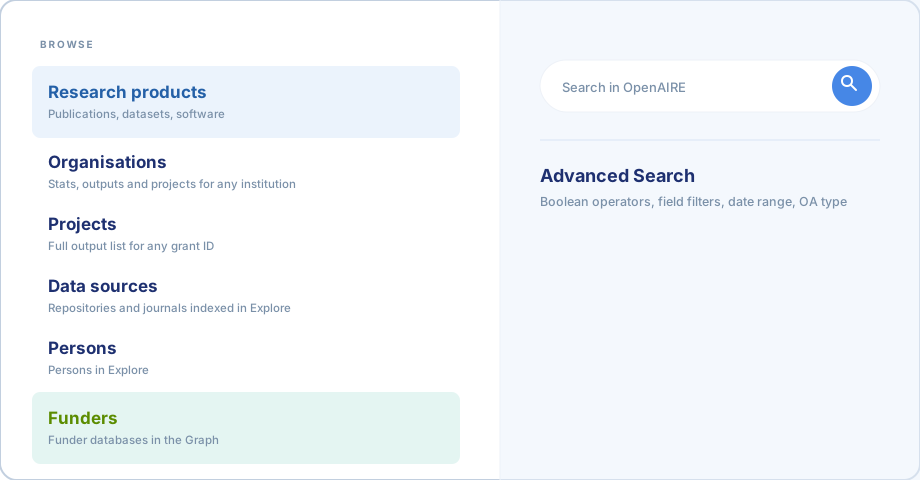
Browse by entity type
Every search spans six entity types, switch between them to explore the graph from a different angle.
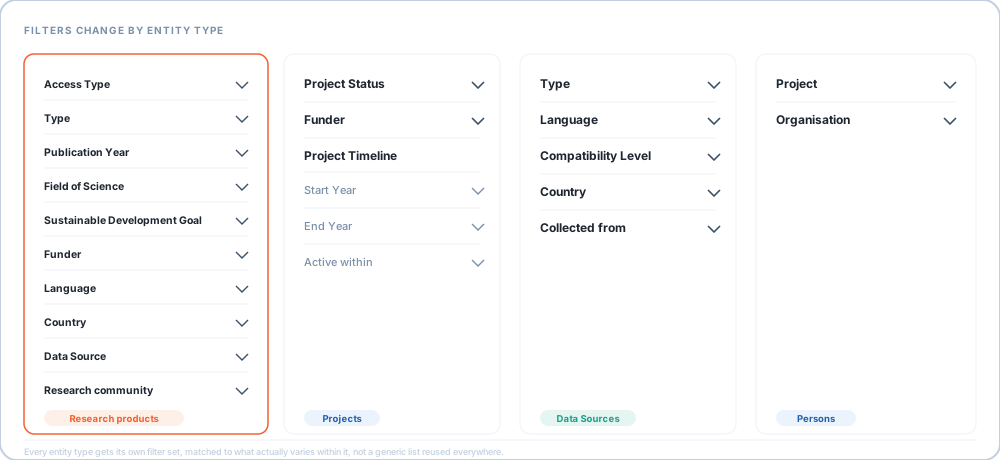
Filter your results
Narrow any search with the full filter panel, results update live as you select. Available filters:
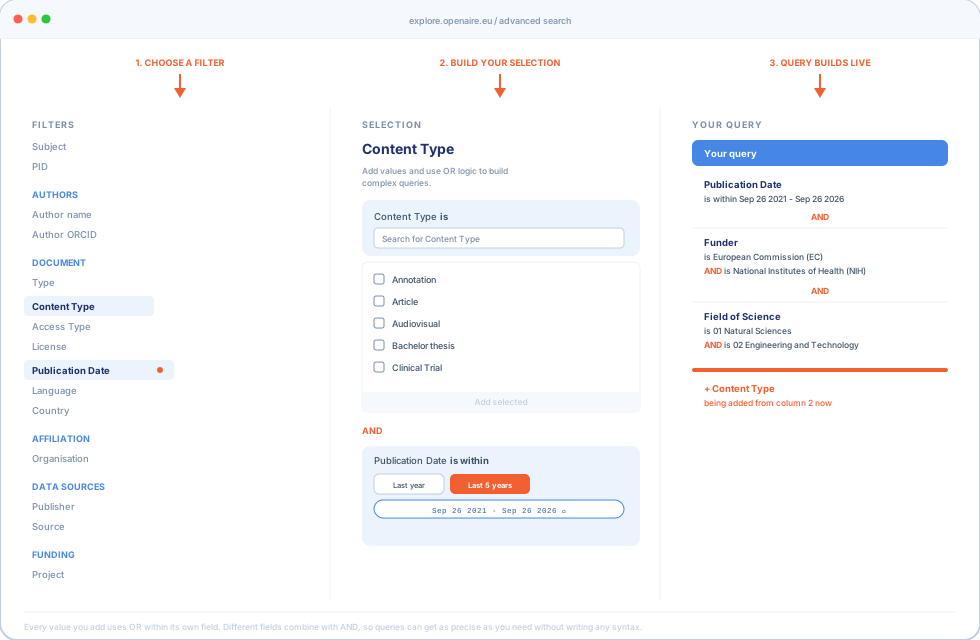
Advanced search & the query builder
For precise, complex queries, the advanced search interface lets you build a query field by field. Pick an entity type, choose a field from the left panel, and every condition you add appears in a running query summary on the right, each with its own AND/OR logic and inline edit or delete. Queries can get as complicated as you need, combining several fields with nested AND/OR logic, without writing a single line of syntax.
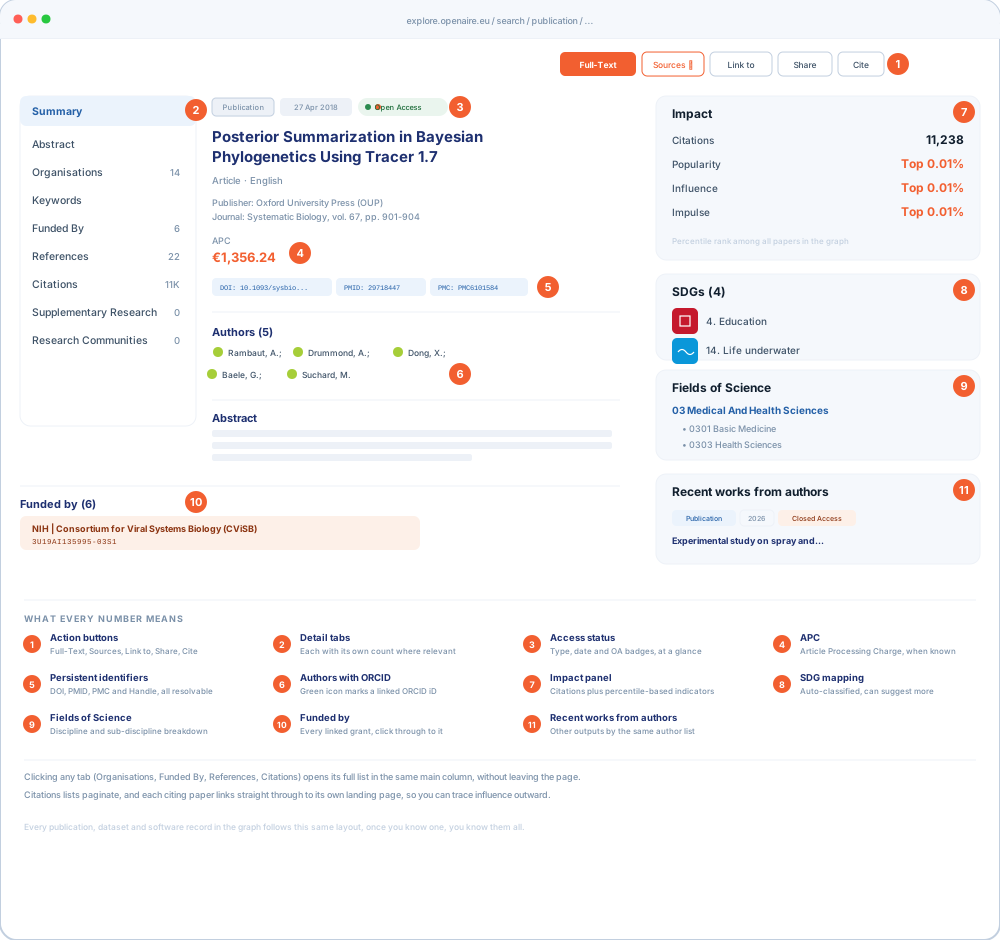
Anatomy of a results page
This is where the graph actually shows its power. A single record is not just a title and an abstract, it is a node connected to everything around it: the grant that funded it, the people who wrote it, the SDGs it contributes to, and every paper that has since built on it. Every publication, dataset or software record you land on follows the same layout. Here is what each part shows.
Dashboards and analytics
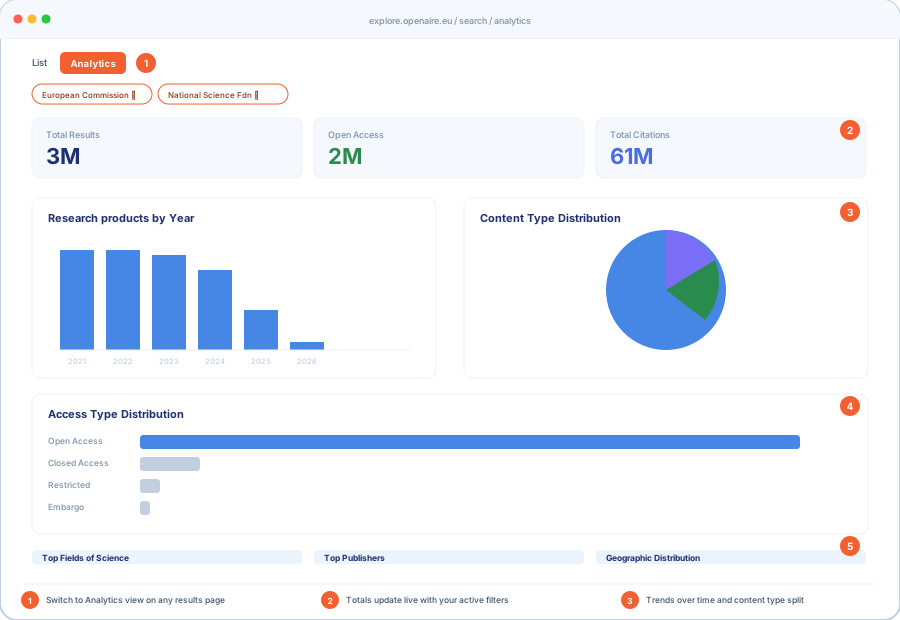
Analytics for any search
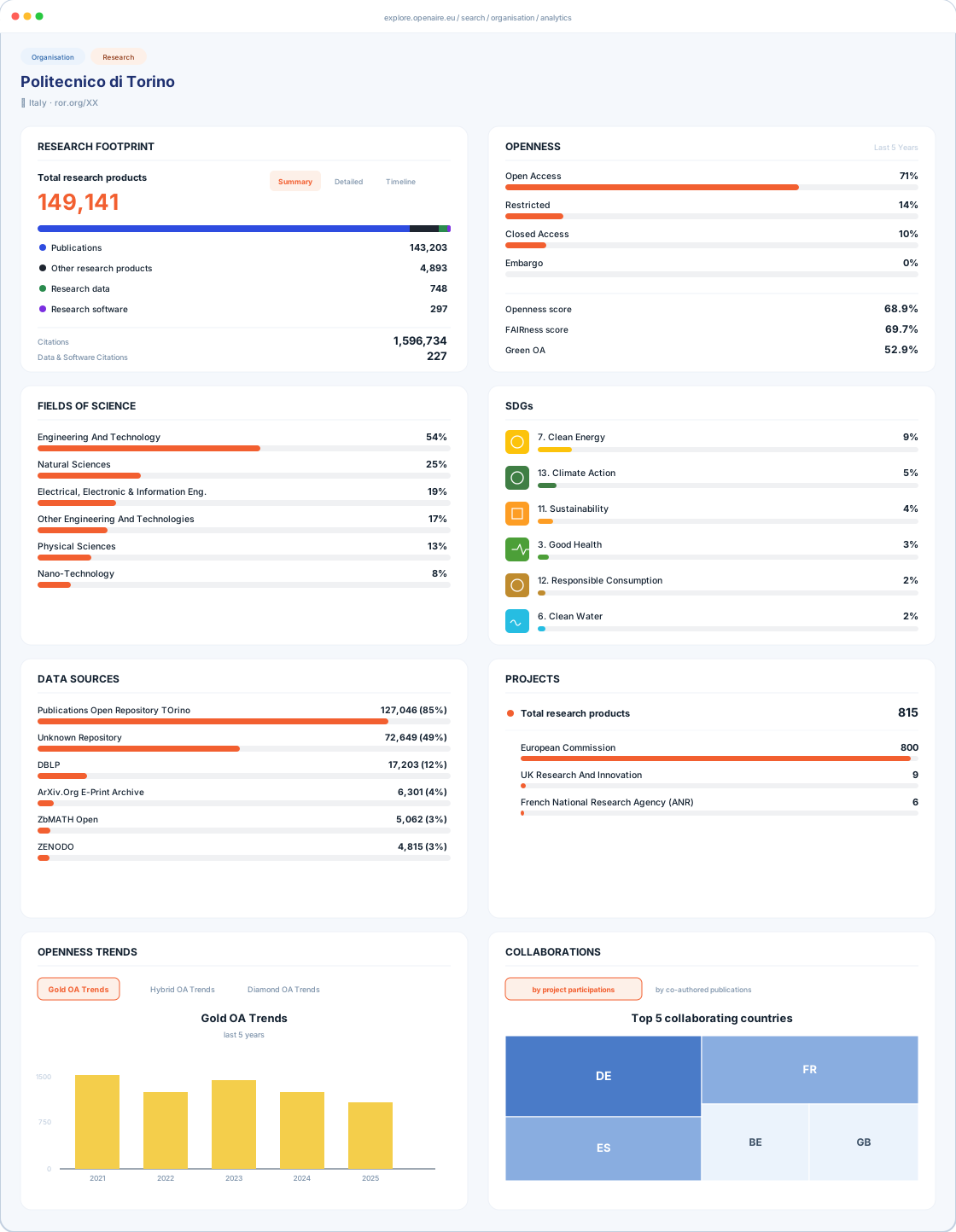
Organisation dashboard
Project dashboard
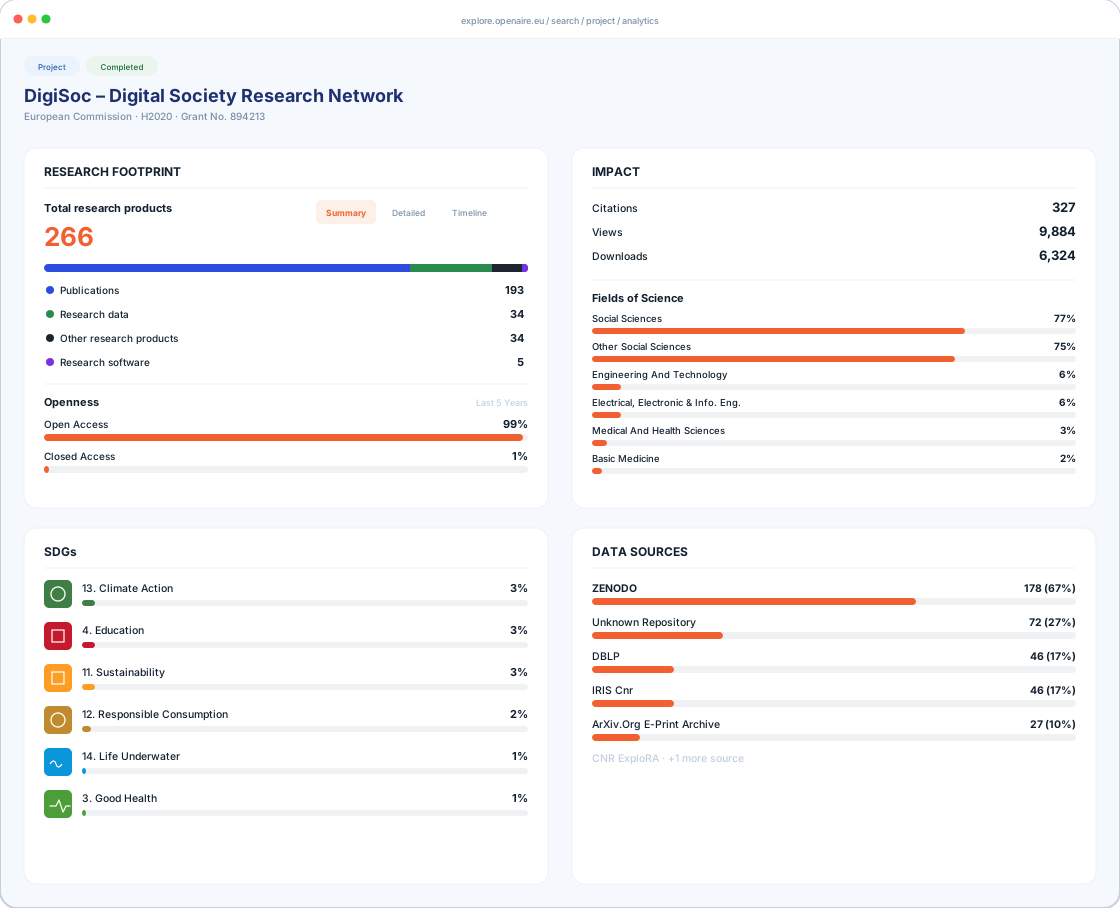
No export needed. Every chart shown here reflects live data. There is nothing to download and recalculate unless you want a copy for offline reporting.
If you need deeper drill-downs, custom indicators or ongoing monitoring beyond what is shown here, OpenAIRE offers these as subscription services.
Embed your grant outputs
When your team or consortium deposits correctly, using the right funder acknowledgement and grant ID, every output is automatically linked to your project in the graph. From there, paste one line of code into your project website and get a live, auto-updating list of all publications, datasets and software linked to your grant. No maintenance, no exports, no manual updates.
For a PI, this means no more chasing partners for their latest publication lists ahead of a review. The list on your site is always current, and the same connected data makes reporting to your funder considerably easier.
Start from your project page
Every grant in the graph has its own page, aggregating everything linked to that project code. This is also where the Embed button lives.
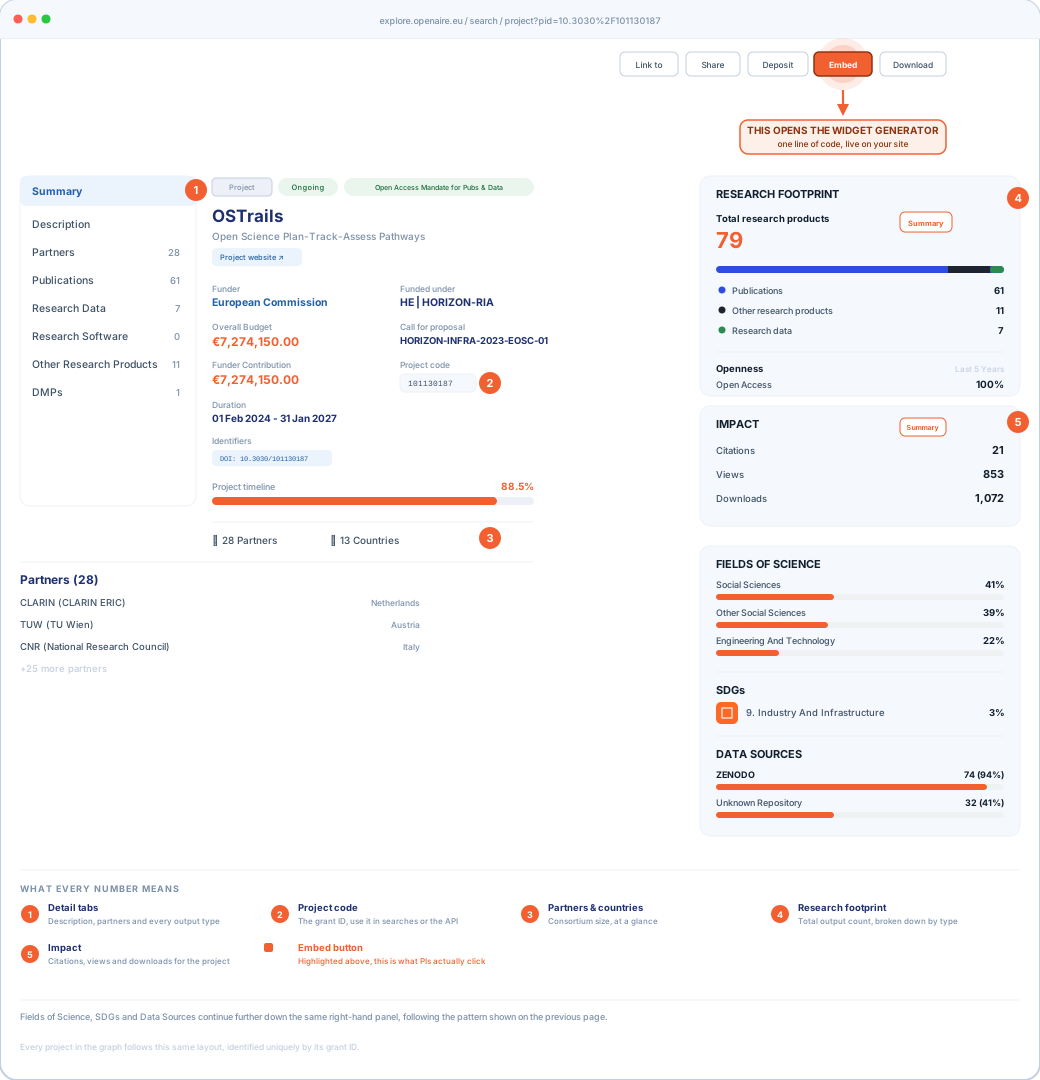
Generate your embed code
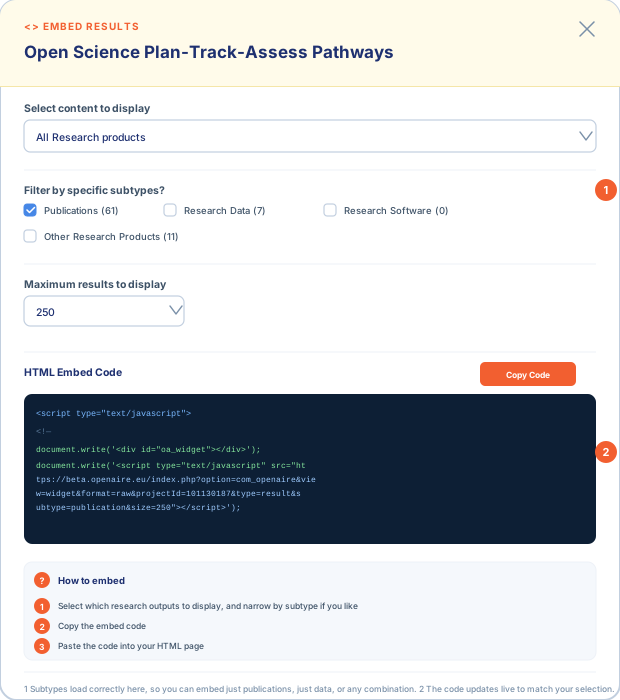
Clicking Embed opens the widget generator. Choose what to display, set a result limit, and copy the ready-made script tag.
-
Select which research outputs to displayChoose all research products or filter to a specific subtype, and set the maximum number of results the widget should show.
-
Copy the embed codeThe code block updates live as you change the options above. One click copies the full script tag, ready to paste.
-
Paste the code into your HTML pageDrop the script tag anywhere in your page's HTML. The widget renders automatically and stays in sync with the graph, no further action needed.
Cannot find your project or grant?
What to try first
If your funder is not yet connected to OpenAIRE, get in touch. We can work with your funder or research office to get the grant database indexed.
Organisation under a different name, or many?
What you can do
Still seeing duplicates or a wrong name after checking OpenOrgs and ROR? Contact us and we will investigate.